> For the complete documentation index, see [llms.txt](https://wiki.nytolia.net/llms.txt). Markdown versions of documentation pages are available by appending `.md` to page URLs; this page is available as [Markdown](https://wiki.nytolia.net/de/getting-started.md).
# Erste Schritte
Hier erfährst du, wie du unserem Server beitrittst.
### Kompatibilität
**Nytolia**.net ist **nur mit Minecraft Java Edition kompatibel**. Stelle sicher, dass du die richtige Version nutzt, um dem Server beizutreten.
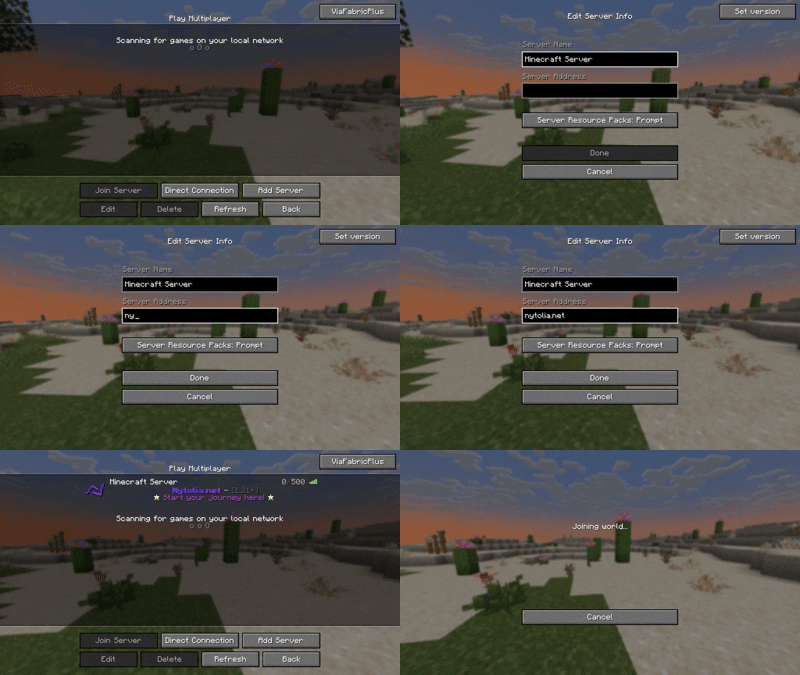
### 1. **Nytolia.net hinzufügen**
1. **Öffne Multiplayer**: Klicke im Hauptmenü auf „Multiplayer“.
2. **Server hinzufügen**: Klicke auf „Add Server“, um die Serverdaten einzugeben.
3. **Serverinformationen eingeben**:
* **Serveradresse**: **Nytolia**.net
4. **Speichern**: Klicke auf „Done“, um den Server deiner Liste hinzuzufügen.
### 2. **Nytolia.net beitreten**
1. **Server auswählen**: Suche **Nytolia**.net im Multiplayer-Menü in deiner Serverliste.
2. **Verbinden**: Klicke auf den Servernamen und dann auf „Join Server“.
Und schon bist du auf **Nytolia**.net!