# Welcome

Official Nytolia Documentation

<figure><img src="https://1053715587-files.gitbook.io/~/files/v0/b/gitbook-x-prod.appspot.com/o/spaces%2FaV5XVEhwiqu5dMFn9Ejn%2Fuploads%2FcINIYajbDvaI0ZrYFGGH%2Fnytolia.png?alt=media&amp;token=dc583a10-bbb9-4e7c-a8fc-207b66157fdb" alt=""><figcaption></figcaption></figure>

**This Website helps you how to play on the server Nytolia.net**

### About Nytolia

**Nytolia**.net is a dynamic Minecraft server offering a custom minecraft survival server. Players can immerse themselves in unique adventures, from exploring expansive dungeons and constructing their dream buildings in the own island.&#x20;


# Getting started

Here you can find how to join our server!

### Compatibility <a href="#device-compatibility" id="device-compatibility"></a>

**Nytolia**.net is **only compatible with Minecraft Java Edition**. Make sure you are using the correct version to join our server.

### 1. **Add Nytolia.net Server**

1. **Go to Multiplayer**: Click on the “Multiplayer” button from the main menu.
2. **Add Server**: Click on the “Add Server” button to enter the server details.
3. **Enter Server Information**:
   * **Server Address**: **Nytolia**.net
4. **Save**: Click “Done” to add the server to your list.

### **2. Join Nytolia.net**

1. **Select Server**: From the Multiplayer menu, find **Nytolia**.net in your server list.
2. **Connect**: Click on the server name and then click “Join Server” to connect.

And then Welcome to **Nytolia**.net !

<figure><img src="https://1053715587-files.gitbook.io/~/files/v0/b/gitbook-x-prod.appspot.com/o/spaces%2FaV5XVEhwiqu5dMFn9Ejn%2Fuploads%2FQ3Y65UXE7maUlMjjfWNv%2FMedalTVMinecraft20250622121207-tr-edit.gif?alt=media&amp;token=6087a14b-4f55-4087-b3f3-6baa71f0e2e5" alt=""><figcaption></figcaption></figure>


# General


# Rules

Here you can see our Rules for the server. Please read the Rules and accept them.

1. **Respect Other Players**: Bullying, harassment, or any forms of disrespectful behavior will not be tolerated. Insults, threats, or discriminatory statements are strictly prohibited.
2. **No Cheating or Hacking**: Using hacks, mods, or any tools that provide an unfair advantage is forbidden. This includes exploiting bugs in the game (bugusing).
3. **No Spamming or Flooding**: Repeatedly sending the same message or flooding the chat is not allowed. Excessive use of caps in chat is also prohibited.
4. **Griefing, Scamming, and Theft**: Players have control over who they trust in their realms and whether they use the server's trade system. However, repeated attempts to bypass these systems to scam others will result in intervention. TP-Traps and other scams will be reviewed upon report and punished accordingly. Verified video evidence of scamming will result in a ban. Lost items/currency will not be refunded.
5. **Common Sense**: Players who disturb the peace and harmony of the community through their actions or chat behavior will not be tolerated. The team reserves the right to temporarily or permanently ban such players to ensure a peaceful and respectful community.
6. **No Inappropriate Buildings**: All buildings and structures must be appropriate for all ages. Offensive or inappropriate structures are not allowed.
7. **No Advertising**: Advertising other servers or products is strictly prohibited, except for content creators who can advertise their social media channels. Smaller, non-official creators may advertise their social media channels up to twice per hour in the chat if they are live streaming on Nytolia.net.
8. **Follow the Instructions of the Team**: Server staff are responsible for maintaining order and assisting players. Their instructions must be followed.
9. **No Real Money Trading**: Trading involving real money is strictly prohibited. This includes the purchase, sale, or exchange of virtual goods, services, or currencies for real money. Violations of this rule will be rigorously enforced, potentially resulting in a network-wide ban and further legal action.

<mark style="color:red;">**Punishment:**</mark> Breaking any of these rules will result in a permanent ban or temporary ban for up to 360 days.

* More Info: [<mark style="color:purple;">https://nytolia.net/rules</mark>](https://www.nytolia.net/rules)


# FAQ

Here you can see an overview of questions that a asked by the community and the answer to them.

### **What is** Nytoli&#x61;**.net?**

Nytolia.net is a Minecraft server offering a gamemode called Adventures. Join us to explore unique adventures and build amazing cities.

### **Is** Nytoli&#x61;**.net compatible with Minecraft Bedrock Edition?**

No, Nytolia.net is only compatible with Minecraft Java Edition. Please ensure you are using the Java Edition to join our server.

### Where can I find updates and news about the server?

Stay updated by following our [<mark style="color:purple;">Blog Site</mark>](https://nytolia.net/blog), joining our Discord server and following us on social media.

### **How do I contact support?**

For support:

* **Visit** [<mark style="color:purple;">**nytolia.net/support**</mark>](https://www.nytolia.net/support)
* **Join our Discord server** and reach out to support through the relevant channels.

If you have any other questions or need further assistance, feel free to reach out through the available support channels. Enjoy your time on Nytolia.net!

### Textures are so buggy, doesn't work?

By using a minecraft shader you override minecraft shaders, that means the resourcepack break because it's working with shaders. We recommend to play without a shader.

If you have some join problems, please open a ticket through our website. Please make also sure you don't use these mods/shaders:

* ViaFabric/Plus
* ImmediatelyFast
* Iris shaders
* other shaders or mods...


# Discord Link

The Discord Account Linking system allows players to securely connect their Minecraft account with their Discord account.

Once linked, players gain access to exclusive features, role synchronization and improved community integration.

***

### Benefits of Linking Your Accounts

By linking your Minecraft and Discord accounts, you will unlock the following advantages:

* 🎖 **Exclusive Free Badge**\
  Receive a special badge that is only available to players who link their accounts.
* 🔗 **Rank Synchronization**\
  Your Minecraft ranks are automatically linked with matching Discord roles.
* ✅ **Account Verification**\
  Prove ownership of your Minecraft account on Discord.

***

### How to Link/Unlink Your Accounts

Linking or unlinking your accounts only takes a few moments.

1. Join the Minecraft server.
2. Use the command `/discord <link or unlink>` in-game. (Only works in lobby)
3. Follow the instructions shown in chat.
4. Once completed, your accounts will be linked automatically.

***

### Rank Synchronization

Once your accounts are linked:

* Minecraft ranks are automatically assigned as Discord roles
* Removing or changing a rank updates your Discord roles accordingly

> ⚠ Rank synchronization may require you to rejoin or wait a few seconds for updates.

***

### Notes

* Each Minecraft account can only be linked to **one Discord account**
* Linking is optional&#x20;
* Staff will never ask for your password


# Support

Need help or want to report an issue? Visit nytolia.net/support to report bugs or players directly.

## Support and Reporting Issues on Nytolia.net

Reporting Bugs and Players via the Support Page

Visit the Support Page: Go to [<mark style="color:purple;">nytolia.net/support</mark>](https://nytolia.net/support).

**Select** the Type of *Report*: Choose whether you are reporting a bug or a player.&#x20;

1. **For Bugs:** Provide a detailed description of the issue, including steps to reproduce it if possible.
2. **For Player Reports:** Include the player’s username, a description of the behavior, and any evidence you may have, such as screenshots or videos.

   Submit Your Report: Fill out the necessary information and submit the form. Our support team will review your report and take appropriate action.
3. **Provide Invoice Details**: Fill out the form with the required details, including your invoice number, date, and a description of the issue or inquiry.


# Store

A overview of the various ranks, currencies, and cosmetics available for purchase.

The Nytolia.net Store offers a diverse range of products designed to enhance your gameplay. These products include ranks, cosmetics, and various currencies. Here, you'll find detailed information about each type of product and how they can benefit your experience on Nytolia.net.

### Ranks

Ranks on Nytolia.net provide players with exclusive perks and privileges that enhance their in-game experience. Each rank comes with its own set of benefits, which may include access to special areas, unique commands & more, but do not provide any gameplay advantages for the player.

#### Available Ranks

1. **Pro**
2. **Premium (monthly)**
3. **Ultra**
4. **Titan**

#### Rubies

Rubies are the primary in-game currency. They can be earned through gameplay, events, or purchased directly from the store. Rubies can be used to buy a wide range of items, including cosmetics and other in-game enhancements.

#### Bundles

Bundles are special packs that contain a variety of cosmetics, offering a comprehensive way to enhance your in-game appearance. These packs provide great value and are an excellent way to collect multiple cosmetics at once.

### Cosmetics

Cosmetics on Nytolia.net allow players to customize their in-game appearance and stand out from the crowd. These items do not provide any gameplay advantages but are a fun way to express your personal style.

1. **Cosmetics**
   * Change your character's appearance with a variety of cosmetics.
2. **Pets**
   * Summon unique pets to accompany you on your adventures.

### How to Purchase & Redeem

1. **Visit the Store**: Go to [<mark style="color:purple;">https://nytolia.net/store/</mark>](https://www.nytolia.net/store/).
2. **Username**: Enter your minecraft username
3. **Select Items**: Browse through the available ranks, currencies, and cosmetics.
4. **Add to Cart**: Add your desired items to the shopping cart.
5. **E-Mail**: Enter your e-mail address for the invoice.
6. **Checkout**: Proceed to checkout and complete your purchase using the available payment methods. (<mark style="color:red;">It can take up to 15 minutes for your payment to be processed.</mark>)
7. **Join Server**: Join our Server and you ready to go!

### Support

If you encounter any issues or have questions about your purchases, please contact FlamePixel.net support. Our support team is available to assist you with any inquiries and ensure you have the best possible experience.

* **Support Email**: [<mark style="color:purple;">support@nytolia.net</mark>](mailto:%20support@nytolia.net)
* **Support Ticket System**: [<mark style="color:purple;">https://nytolia.net/support</mark>](https://nytolia.net/support).


# Partner Program

Become a partner and enjoy exclusive benefits!

## Become a Partner and Enjoy Amazing Features!

We're excited to introduce our Partner Program. Join now and unlock a variety of fantastic benefits!

## **What Do You Get as a Partner?**

Here's what you can look forward to:

* **Personal 10% Discount Code**: Share a unique 10% discount code with your audience.
* **Website Recognition**: Get featured on our website. Check out [<mark style="color:purple;">here</mark>](https://www.nytolia.net/partner/).
* **Custom Cosmetic Item**: Receive a custom cosmetic item on the server to showcase your partnership.
* **Exclusive Roles**: Gain the Partner role on our Discord server and get a partner badge on our minecraft server.

### **Join Now!**

Don't miss out on this opportunity to become an integral part of the Nytolia.net community. Join our Partner Program today and start enjoying these amazing benefits. Apply now via [<mark style="color:purple;">Partner Application</mark>](https://www.nytolia.net/partner-appeal) and take your content creation to the next level!


# Voting

Voting for Nytolia.net is a great way to support our server and earn exciting rewards.

## How to Vote for Nytolia.net and Get Rewards

**1. Go to the Voting Page**

Visit [<mark style="color:purple;">nytolia.net/vote</mark>](https://www.nytolia.net/vote) to begin the voting process.

<figure><img src="https://1053715587-files.gitbook.io/~/files/v0/b/gitbook-x-prod.appspot.com/o/spaces%2FaV5XVEhwiqu5dMFn9Ejn%2Fuploads%2FXhvPZOEUgroUgOMc0Gv5%2Fgrafik.png?alt=media&amp;token=dca95e37-679c-4518-8a5d-5f82a1a1a04d" alt=""><figcaption></figcaption></figure>

**2. Submit Your Minecraft Username**

You will be redirected to a voting site where you need to enter your Minecraft username. This is necessary to validate your vote and link it to your account.

<figure><img src="https://1053715587-files.gitbook.io/~/files/v0/b/gitbook-x-prod.appspot.com/o/spaces%2FaV5XVEhwiqu5dMFn9Ejn%2Fuploads%2F8WvABNmo8HPvUgZsPYXP%2Fgrafik.png?alt=media&amp;token=3bac43a9-8fb9-468d-85fa-00c46b02b52b" alt=""><figcaption></figcaption></figure>

**3. Receive Your Vote Key**

After successfully submitting your vote, you will receive a Vote Key. This key allows you to open a special crate in-game.

**4. Claim Your Rewards**

Log in to Nytolia.net and use your Vote Key to open the crate. The crate contains various rewards, such as in-game currency, items, and other bonuses.

<mark style="color:red;">**Note:**</mark> Make sure to vote regularly to keep receiving rewards and support the server. If you encounter any issues or have questions, reach out to our support team on Discord or through our support page.

Thank you for supporting Nytolia.net! Enjoy your rewards and have fun in the game!


# Emoji

Here you can see a overview about emojis.

### Player Emojis

* **:angel:** - Angel emoji
* **:angry:** - Angry emoji
* **:blue\_heart:** - Blue heart emoji
* **:broken\_heart:** - Broken heart emoji
* **:concerned:** - Concerned expression emoji
* **:confused:** - Confused expression emoji
* **:confused\_2:** - Alternative confused expression emoji
* **:contagious:** - Contagious face emoji
* **:cry:** - Crying face emoji
* **:demon:** - Demon face emoji
* **:dislike:** - Thumbs down emoji
* **:elegant:** - Elegant expression emoji
* **:eyes\_hearts:** - Heart eyes emoji
* **:eyes:** - Eyes emoji
* **:fachero:** - Cool face emoji
* **:fascinated:** - Fascinated expression emoji
* **:frozen:** - Frozen face emoji
* **:green\_heart:** - Green heart emoji
* **:heart:** - Red heart emoji
* **:joy:** - Laughing with tears emoji
* **:joy\_2:** - Alternative laughing emoji
* **:like:** - Thumbs up emoji
* **:nausea:** - Nauseated face emoji
* **:nerd:** - Nerd face emoji
* **:pull\_tongue:** - Tongue out emoji
* **:purple\_heart:** - Purple heart emoji
* **:sad\_2:** - Alternative sad expression emoji
* **:sad:** - Sad face emoji
* **:scream:** - Screaming face emoji
* **:skull:** - Skull emoji
* **:sleeping:** - Sleeping face emoji
* **:smiling:** - Smiling face emoji
* **:sneeze:** - Sneezing face emoji
* **:stunned:** - Stunned face emoji
* **:thumbdown:** - Thumbs down emoji
* **:thumbup:** - Thumbs up emoji
* **:to\_sigh:** - Sighing face emoji
* **:vomit:** - Vomiting face emoji
* **:wink:** - Winking face emoji
* **:without\_expresion:** - Expressionless face emoji
* **:yellow\_heart:** - Yellow heart emoji

### Pro Emojis

* **:amongus:** - Among Us character emoji
* **:gg:** - Good game emoji
* **:gift:** - Gift box emoji
* **:therock:** - The Rock meme emoji
* **:troll:** - Troll face emoji
* **:zerotwo:** - Zero Two anime character emoji

### Premium Emojis

* **:kek:** - Kek laughing emoji
* **:pepe\_diamond\_sword:** - Pepe with a diamond sword emoji
* **:pepeaff:** - Pepe affectionate emoji
* **:pepeangel:** - Angelic Pepe emoji
* **:pepehappy:** - Happy Pepe emoji
* **:pepehypers:** - Pepe Hypers emoji
* **:pepemonkas:** - Pepe Monkas emoji
* **:pepeno:** - Pepe No emoji
* **:pepeokayge:** - Pepe Okayge emoji
* **:pepesip:** - Pepe sipping emoji
* **:pepesob:** - Crying Pepe emoji
* **:pepetux:** - Pepe in a tuxedo emoji
* **:pepeyes:** - Pepe with wide eyes emoji
* **:pepeangry:** - Angry Pepe emoji

### Ultra Emojis

* **:crythumbsup:** - Crying thumbs up emoji
* **:flushed:** - Flushed face emoji
* **:gigachad:** - Giga Chad meme emoji
* **:pepeexit:** - Pepe the Frog exiting emoji
* **:pepeunicorn:** - Pepe the Frog unicorn emoji

### Titan Emojis

* **:jerry:** - Jerry meme emoji
* **:oh:** - "Oh?" reaction emoji
* **:omegalul:** - OMEGALUL laughing emoji
* **:susface:** - Suspicious face emoji
* **:think:** - Thinking face emoji
* **:uhok:** - "Uh, OK?" reaction emoji
* **:waitwhat:** - "Wait, what?" reaction emoji
* **:yessir:** - "Yes, sir!" reaction emoji
* **:thonk:** - Thonk meme emoji


# Commands

### Global Commands <a href="#commands" id="commands"></a>

| Command  | Usage                       | Description               |
| -------- | --------------------------- | ------------------------- |
| hub      | `/hub`                      | Back to the lobby         |
| settings | `/settings`                 | Settings Menu             |
| vote     | `/vote`                     | Vote for the server!      |
| discord  | `/discord <link or unlink>` | Link your discord account |
| website  | `/website`                  | Website Info              |
| language | `/language`                 | Change your language      |
| support  | `/support`                  | Get to the support site   |
| rules    | `/rules`                    | Rules Page                |
| rewards  | `/rewards`                  | Rewards Menu              |

### Adventures Commands <a href="#commands" id="commands"></a>

<table><thead><tr><th>Command</th><th width="249">Usage</th><th>Description</th></tr></thead><tbody><tr><td>spawn</td><td><code>/spawn</code></td><td>Teleports to the spawn</td></tr><tr><td>warp</td><td><code>/warp</code></td><td>Warp menu</td></tr><tr><td>islands</td><td><code>/islands</code></td><td>Manage your island</td></tr><tr><td>home</td><td><code>/home</code></td><td>Home Menu</td></tr><tr><td>delhome</td><td><code>/delhome &#x3C;name></code></td><td>Delete Home</td></tr><tr><td>sethome</td><td><code>/sethome &#x3C;name></code></td><td>Set Home</td></tr><tr><td>workbench, wb, craft</td><td><code>/workbench</code></td><td>Open the workbench</td></tr><tr><td>enderchest, ec</td><td><code>/enderchest</code></td><td>Open the enderchest</td></tr><tr><td>heal</td><td><code>/heal</code></td><td>Heal yourself</td></tr><tr><td>skull</td><td><code>/skull</code></td><td>Get a skull</td></tr><tr><td>sign</td><td><code>/sign</code></td><td>Sign a item</td></tr><tr><td>hat</td><td><code>/hat</code></td><td>Get a item on your head</td></tr><tr><td>ptime</td><td><code>/ptime</code></td><td>Change the time for yourself</td></tr><tr><td>pweather</td><td><code>/pweather</code></td><td>Change the weather for yourself</td></tr><tr><td>anvil</td><td><code>/anvil</code></td><td>Opens the anvil</td></tr><tr><td>flamepass, fp</td><td><code>/flamepass</code></td><td>FlamePass Menu</td></tr><tr><td>auction, auctionhouse, ah</td><td><code>/auctionhouse</code></td><td>Auction Menu</td></tr><tr><td>sell</td><td><code>/sell</code></td><td>Sell items</td></tr><tr><td>quests, quest</td><td><code>/quests</code></td><td>Quest Menu</td></tr></tbody></table>


# World


# Origin World

The Origin World is the heart of the server. Unlike other worlds, the origin world is a adventure world to complete quests, go on dungeons and get in the storyline.

It is a land of floating islands, serving as the bridge between all known worlds.

***

### Aurelius: The Rift Guardian

Aurelius is an ancient old man tasked with maintaining the balance between dimensions. He serves as the Primary Teleportation Hub for the server. By interacting with him, players can access the various Rifts that lead to other worlds.

#### Navigation Menu

When speaking to Aurelius, you can choose from the following destinations:

1. The Resource World
2. The Islands

***

### Adventures & Dungeons

The Origin World isn't just a lobby; it's a springboard for action.

* NPC Quests: Many NPCs in the Origin World have tasks that require you to travel to other dimensions and return with specific trophies.
* The Dungeon Gate: Located just behind Aestalgard, there are more cities to explore and get into dungeons!


# Resource World

#### 🗺️ Overview

The Resource World is a shared. Unlike your personal island, this world is temporary. To keep the landscape fresh and the ores plentiful, the entire dimension is reset on a regular schedule.

* Purpose: Gathering raw materials (Wood, Stone, Ores, Crops) to build on your own island.
* Reset Cycle: Every Sunday at 12:00 AM Server Time.
* Difficulty: Normal (Hunger and mobs are active).

***

#### 🪓 Resources

While you can find almost everything here like in minecraft, players primarily visit for the following quests:

| Resource    | Best Biome            | Common Uses                                      |
| ----------- | --------------------- | ------------------------------------------------ |
| Wood        | Forests / Jungles     | Building blocks, charcoal, and early-game tools. |
| Stone/Ores  | Extreme Hills / Caves | Upgrading gear and island structures.            |
| Sand/Gravel | Deserts / Rivers      | Glass production and concrete for modern builds. |


# Islands

#### 🏝️ Features of Your Island

Every player starts with a basic floating island, but the potential for expansion is nearly limitless.

* Total Protection: By default, only you can break or place blocks. You are the owner of your island.
* Persistent Progress: Unlike the Resource World, your structures, chests, and crops stay exactly where you put them forever.

***

#### 🛠️ Island Management

Managing your island is handled through a player interface. You can access this at any time by typing `/islands`.

***

#### 🤝 Your Island, your Way

You have full control over who visits your house and build anything you want.

* Visitors: You can set your island to `Public` to show off your builds, or `Private` to keep everyone out.
* Co-op: Adding a player to your "Team" allows them to share your chests and island level, but choose wisely—team members have full access to your hard-earned loot!


# System


# Guild System

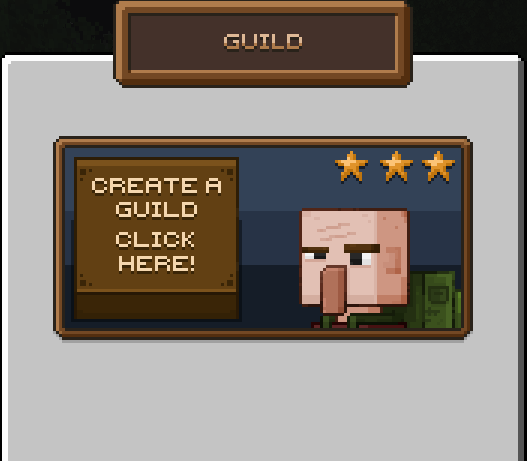
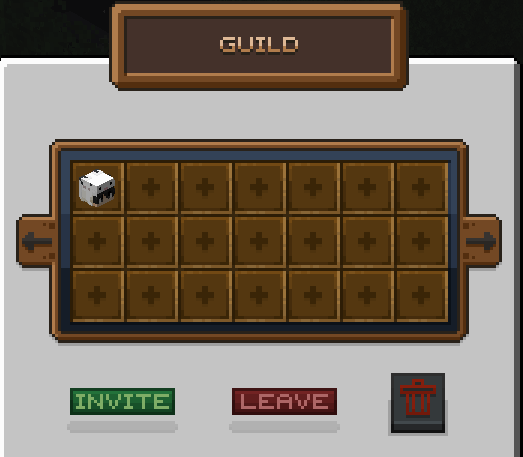
The Guild System in Minecraft allows players to join together, form alliances, and compete collectively in battles. With features like custom guild tags, unique names, a friends-invite system, and a guild menu for easy management, players can enjoy a more interactive and social gaming experience. Guilds enhance teamwork, provide shared goals, and offer new gameplay dimensions on multiplayer servers.

<figure><img src="https://1053715587-files.gitbook.io/~/files/v0/b/gitbook-x-prod.appspot.com/o/spaces%2FaV5XVEhwiqu5dMFn9Ejn%2Fuploads%2FvYIHU1m6X9Bt6uerVFDU%2Fguildcreate.png?alt=media&amp;token=7d2addfe-8838-4c71-8714-9488b70db9b3" alt=""><figcaption><p>Create a Guild</p></figcaption></figure>

### How to Create a Guild

To create a guild, follow these simple steps:

1. **Go to the Adventurer’s Guild**: First, make your way to the Adventurer’s Guild. This is usually a special location or NPC (Non-Player Character) in the game that will help you with guild creation.
2. **Choose a Guild Tag**: Select a unique tag for your guild, typically 3-4 characters long. This tag will represent your guild in chat and other guild-related displays.
3. **Choose a Guild Name**: Pick a name for your guild, between 3 and 14 characters. Make it memorable and reflective of your guild's identity!
4. **Pay the Cost**: Guild creation requires a fee of 1,000 coins. Ensure you have enough money in your account before proceeding.
5. **Done!** Once you've selected your tag, name, and paid the fee, your guild is officially created! You can now invite friends, organize guild events, and start building your guild’s reputation.

<figure><img src="https://1053715587-files.gitbook.io/~/files/v0/b/gitbook-x-prod.appspot.com/o/spaces%2FaV5XVEhwiqu5dMFn9Ejn%2Fuploads%2FILGB7riOKboRG0XuxDyG%2Fguild.png?alt=media&amp;token=1ea07c8a-5245-4005-bdec-a3a8d982a843" alt=""><figcaption><p>Guild Overview</p></figcaption></figure>

### **Features**

1. **Customizable Guild Tag**: When creating a guild, players can select a custom tag (3-4 characters) to represent their guild in the chat or above player names. Tags help guild members stand out and showcase their affiliation.
2. **Unique Guild Names**: Guild names can be chosen by the leader, typically with character limits between 3 and 14 characters. These names help identify guilds and add personality to each group.
3. **Invite Friends**: Guild leaders or members with permission can invite friends to join their guild. This system fosters a social community and encourages players to team up, strategize, and compete as a group.
4. **Guild Battles**: Members can battle together as a guild in PvP or PvE events. This team-based approach gives guilds a chance to compete against others or face challenging mobs as a united force, testing coordination and skills.
5. **Guild Menu**: A dedicated guild menu makes managing the guild simple and accessible. Through this menu, members can view guild details, see member lists, manage ranks and permissions, and track guild achievements or progress.
6. **Guild Progression and Rewards**: Many guild systems include levels, achievements, or rewards that guilds can unlock as they progress. Completing tasks together can grant guild-wide buffs, special items, or increased privileges, encouraging players to stay active and contribute.

### **How It Works**

* **Creating a Guild**: A player (often called the guild leader) can start a guild by selecting a name and tag that meet the character requirements. This guild becomes a new team that other players can join by invitation.
* **Managing Guild Members**: Using the guild menu, leaders can invite new members, manage ranks, and set permissions. Different roles within the guild (e.g., member, officer, leader) allow specific players to invite others, lead battles, or manage resources.
* **Participating in Guild Battles**: Guild members can join forces in organized battles, either against other guilds (PvP) or in special PvE events where they face mobs. In these events, guild tags and names are displayed, promoting the guild’s unity and identity.
* **Guild Menu Navigation**: The guild menu is accessible to all members, providing options to view member status, see guild statistics, and access guild-specific functions. Leaders use this menu to manage guild settings, assign roles, and monitor guild progression.

### **Benefits**

* **Enhanced Social Interaction**: The invite system and guild-exclusive chat encourage players to form connections and friendships within the server.
* **Organized Team Play**: With guild battles and PvE events, players experience organized team-based gameplay, adding a strategic layer to Minecraft.
* **Player Identity and Customization**: Guild tags and unique names give players a sense of identity and belonging. Guilds often become a point of pride, and players are motivated to represent their guild in battles and events.


# FlamePass System


# Home System


# Trade System


# Skill System


# Crates

A list of available crates, their costs, and instructions on how to buy keys.

### Accessing the Keyshop

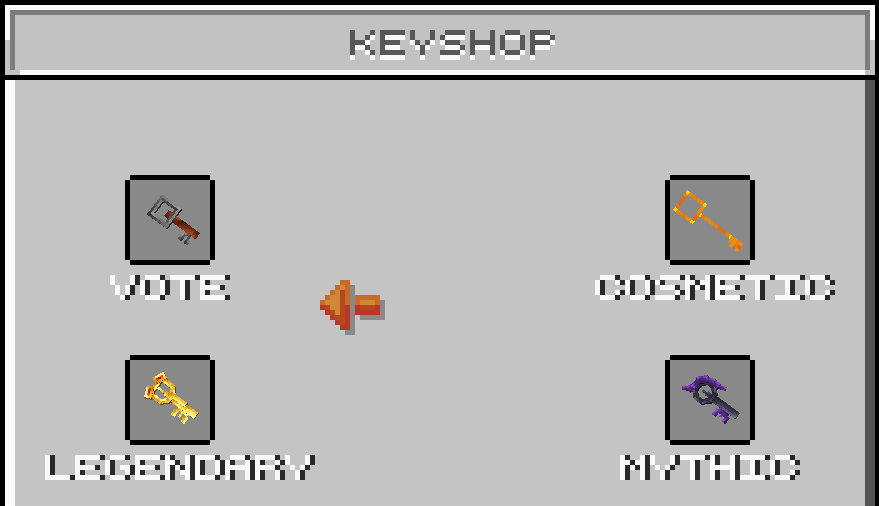
To access the Keyshop, use the command `/keyshop`. This command will open a menu where you can purchase keys for different types of crates. Each crate type requires a different number of rubies, the in-game currency, except for the Vote crate, which is only available through voting for the server.

<div><figure><img src="https://1053715587-files.gitbook.io/~/files/v0/b/gitbook-x-prod.appspot.com/o/spaces%2FaV5XVEhwiqu5dMFn9Ejn%2Fuploads%2FbEZNkwNUYvPFV2Wn1GiH%2Fgrafik.png?alt=media&amp;token=635b8f29-27bf-40f9-94f1-044bdaf5782f" alt="" width="375"><figcaption></figcaption></figure> <figure><img src="https://1053715587-files.gitbook.io/~/files/v0/b/gitbook-x-prod.appspot.com/o/spaces%2FaV5XVEhwiqu5dMFn9Ejn%2Fuploads%2F3pcJJwkouQ4nBUj7uVEG%2Fgrafik.png?alt=media&amp;token=b93f6b79-67f9-4756-83f6-f958a6efb763" alt="" width="375"><figcaption></figcaption></figure></div>

### Crates and Pricing

Here’s a list of the available crates and the cost in rubies for each key:

1. **Common Crate**
   * **Cost:** 24 rubies
2. **Uncommon Crate**
   * **Cost:** 36 rubies
3. **Rare Crate**
   * **Cost:** 50 rubies
4. **Epic Crate**
   * **Cost:** 80 rubies
5. **Vote Crate**
   * **Availability:** Only available by voting for the server (cannot be purchased).
6. **Cosmetic Crate**
   * **Cost: 115** rubies
7. **Legendary Crate**
   * **Cost: 180** rubies
8. **Mythic Crate**

   * **Special Crate&#x20;**<mark style="color:$success;">**\[LIMITED TIME]**</mark>
   * **Cost:** **245** rubies

### How to Buy Keys

1. Type `/keyshop` in the chat.
2. The Keyshop menu will appear, displaying all the available crates and their corresponding key prices.
3. Click on the crate you wish to buy a key for.
4. Confirm your purchase if prompted. The appropriate number of rubies will be deducted from your balance, and the key will be added to your inventory.

### Obtaining Rubies

Rubies, the currency required to purchase keys, can be obtained through regular gameplay or the [<mark style="color:$primary;">store page</mark>](https://nytolia.net/store).&#x20;


# Name Color

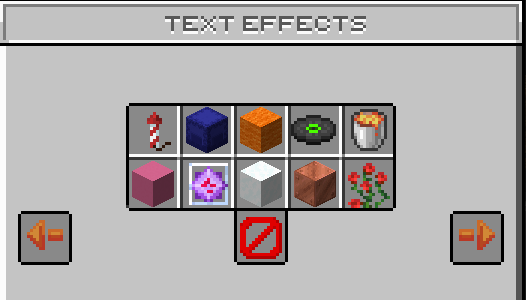
Customize your in-game name and chat messages with vibrant colors and animated effects. Stand out and express your unique style on Nytolia.net with our dynamic text personalization options!

<figure><img src="https://1053715587-files.gitbook.io/~/files/v0/b/gitbook-x-prod.appspot.com/o/spaces%2FaV5XVEhwiqu5dMFn9Ejn%2Fuploads%2FxEIhFcQQyBWBIucv2DJB%2Ftexteffects.png?alt=media&amp;token=8137ad14-d707-49f7-8aaf-c2dd919c59bd" alt=""><figcaption></figcaption></figure>

## What are Text Effects?

On Nytolia.net, players have the exciting option to personalize their experience by changing their name color and applying text effects. This feature allows players to stand out in the chat and express their individuality. By using special commands or accessing certain in-game items, players can select from a range of colors and effects to customize their names. Whether you want a bold red name, a cool blue one, or even animated text effects, Flamepixel.net offers the tools to make your in-game identity truly unique and vibrant.

## How do i set a Text Effect?

You can simply open the Text effect menu with /texteffects. In this menu you see many text effects that you can unlock with special ranks via [Store](https://nytolia.net/store).


# Level System

This system is a unique progression track designed to reward your journey. It is completely independent of your standard Minecraft experience bar, focusing entirely on your growth within our world.

***

#### ⚔️ Earning XP

There are currently 3 primary ways to increase your custom level.

1. Slaying Monsters:

   — Defeating any non-player mob (Zombies, Skeletons, Creepers, etc.) grants you between 1 to 3 XP per kill.
2. Experience Bottles:&#x20;

   — Right-click the bottle for granting you 1 to 2 XP towards your level.
3. Quests:

   — Story Quests grants you significant XP boosts

   — Daily Tasks provides a pool of XPs

***

#### 📊 XP Requirements

The higher your level, the more dedication is required to reach the next one. Here is a breakdown of the XP needed per level:

| Level Range | XP Required per Level            |
| ----------- | -------------------------------- |
| 1 - 9       | 20 XP                            |
| 10 - 19     | 50 XP                            |
| 20 - 29     | 80 XP                            |
| 30 - 39     | 105 XP                           |
| 40 - 119    | *Scales from 205 up to 1,500 XP* |
| 120+        | 2,000 XP                         |

***

#### 🛠 Commands & HUD

You can monitor your progress at any time using the following tools:

* `/level`
  * Displays a detailed status menu in your chat, showing your current Level and exact XP count.
* Progress Bar:
  * You can see your live progress bar on your level bar or on the scoreboard, so you always know exactly how close you are to your next Level Up.


# Season System

Overview about our seasons!

## Temperature Modifiers

Your internal temperature is not static; it is constantly modified by several environmental factors:

* Armor: Heavy plate might keep you warm in winter but cause overheating in summer.
* Biome & Height: Climbing a mountain or entering a desert drastically shifts the needle.
* Light & Blocks: Standing near lava or glowstone provides warmth.
* Activity: Sprinting generates body heat, while swimming in water cools you down.
* Time & Weather: Night time and rain bring significant temperature drops.

#### Hazards

* Freezing: If your temperature drops too low, you will suffer from the freezing effect and eventually dealing ticking damage.
* Burning: Overheating leads to exhaustion and fire damage if not managed by seeking shade or water.

***

## The Season Events

#### ☀️ Summer

Summer is a season of abundance and harsh sun.

* Weather: No rain occurs during this season.
* Flora: Berry bushes spawn everywhere, and crops benefit from accelerated growth rates.
* Mob Shifts: Standard Zombies are replaced by Husks.
* Fauna: Jungle animals (Parrots, Ocelots, and Pandas) see a 30% spawn rate increase.
* Cleanup: To maintain the summer vibe, any flowers spawned during Spring are automatically removed when chunks load.

#### 🍂 Autumn

As the leaves turn, the world becomes a bit more mysterious and fungal.

* The Great Pumpkin: Mobs have a 20% chance to spawn wearing a Carved Pumpkin.
* Flora: Mushroom patches emerge across the landscape, but Sweet Berry Bushes from previous seasons are removed.
* Fauna: Mooshrooms, Frogs, and Foxes see a 30% spawn rate increase.

#### ❄️ Winter

Winter is the most challenging season for survivalists, demanding preparation and indoor farming.

* Agricultural Stasis: Crops and plants will not grow if they have a direct line of sight to the sky. You must build greenhouses (solid blocks above crops) to farm.
* Mob Shifts: Standard Skeletons are replaced by Strays.
* Fauna: Wolves, Foxes, and Polar Bears see a massive 50% spawn rate increase.
* Atmospherics: Each night has a 20% chance to display an Aurora Borealis, created by `FIREWORK_SPARK` particles shimmering high above the player.

#### 🌱 Spring

A time of recovery and population growth for the world’s livestock.

* Flora: A massive variety of flowers are added to newly generated chunks, brightening the landscape.
* Fauna: The "farm" animals—Sheep, Cows, Pigs, Rabbits, and Chickens—receive a 30% spawn rate increase, making it the ideal time for breeding.

***

> Tip: You can go to Astraea to get the information about the current season, every 60 mins the seasons change so look out!


# Healthbar System

Overview about the healthbar system, how it works, use cases, what the limitations are...!

The Bossbar Health Bar System in Minecraft provides a dynamic health display for mobs, visible above the mob's head whenever a player looks at it. This health bar system allows players to see real-time updates on mob health, including the damage they deal, making combat interactions more immersive and informative. This system is limited to mobs, ensuring it doesn’t clutter the interface when players are viewing each other.

<figure><img src="https://1053715587-files.gitbook.io/~/files/v0/b/gitbook-x-prod.appspot.com/o/spaces%2FaV5XVEhwiqu5dMFn9Ejn%2Fuploads%2F0zcDg7daSrg6MSBo1ALU%2Fhealthbar.png?alt=media&amp;token=77d630cf-3450-48c5-807d-e39c3a04e73f" alt=""><figcaption></figcaption></figure>

### **Features**

1. **Health Display Above Mobs**: The health bar appears above mobs when a player is looking at them, providing a clear view of the mob’s current health.
2. **Damage Tracking**: The system shows the exact amount of damage inflicted each time a player attacks a mob. This allows players to see their damage output and adjust their strategy accordingly.
3. **Mob-Specific Display**: The health bar system is designed specifically for mobs. Players do not have health bars, keeping the visual focus on non-player entities and ensuring minimal interface clutter in PvP scenarios.
4. **Real-Time Health Update**: As the mob takes damage, the health bar decreases in real time, showing a visual representation of the remaining health. This is particularly useful for players to gauge how close a mob is to being defeated.

### **Use Cases**

* **Enhanced PvE Combat**: By showing players exactly how much health a mob has left, this system enhances combat depth and strategy. Players can better manage their attacks and resources, especially in boss fights or against mobs with high health.
* **Damage Output Feedback**: For players who want to optimize their gear or skills, seeing real-time damage output can be valuable in assessing weapon effectiveness or evaluating enchantment setups.

### **Conclusion**

The Custom Health Bar System is a valuable addition to Minecraft, providing players with real-time information on mob health and damage dealt. This feature enhances the combat experience, especially in PvE-focused settings, by delivering precise feedback and enabling strategic gameplay adjustments. With careful implementation, it can add immersion and utility to various Minecraft gameplay scenarios.


# Daily Rewards (Coins)

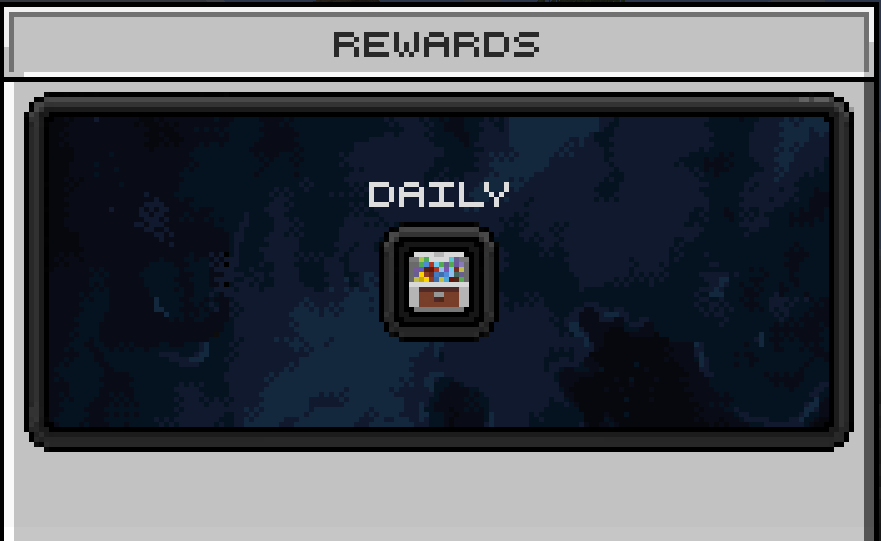
The Daily Rewards System allows players to claim a random number of coins each day by using the `/rewards` command. The number of coins awarded ranges from 10 to 200, with the chances of receiving higher amounts being significantly lower. Players can use this command on themselves or specify another player to receive the rewards.

<figure><img src="https://1053715587-files.gitbook.io/~/files/v0/b/gitbook-x-prod.appspot.com/o/spaces%2FaV5XVEhwiqu5dMFn9Ejn%2Fuploads%2Fk8DhhONBaphlOhHerLvs%2Fgrafik.png?alt=media&amp;token=2da717f1-ce6a-4fc4-86cd-d368a9e8971a" alt="" width="563"><figcaption></figcaption></figure>

### Coins Chances

The probability of receiving each amount of coins is as follows:

* **10–30 Coins**: 50%
* **31–60 Coins**: 25%
* **61–100 Coins**: 12.5%
* **101–130 Coins**: 6.25%
* **131–150 Coins**: 3.13%
* **151–170 Coins**: 1.56%
* **171–185 Coins**: 0.78%
* **186–195 Coins**: 0.39%
* **196–199 Coins**: 0.20%
* **200 Coins**: 0.10%

### Command Usage

#### `/rewards`

When a player uses the `/rewards` command, they will receive a random amount of coins based on the chances outlined above. If no player is specified, the command will reward the player who issued the command.

### Cooldown

There is a 24-hour cooldown for claiming daily rewards. Once a player has claimed their reward, they must wait 24 hours before they can claim again.

### Claiming Rewards

Players must claim their daily rewards through an in-game menu. The command initiates the reward process, but players need to interact with the menu to finalize the claim and receive their coins.


# Daily Rewards (rubies)

Overview about the Daily Rewards System

The Daily Rewards System allows players to claim a random number of rubies each day by using the `/rewards` command. The number of rubies awarded ranges from 1 to 10, with the chances of receiving higher amounts being significantly lower. Players can use this command on themselves or specify another player to receive the rewards.

<figure><img src="https://1053715587-files.gitbook.io/~/files/v0/b/gitbook-x-prod.appspot.com/o/spaces%2FaV5XVEhwiqu5dMFn9Ejn%2Fuploads%2F03GCc2vdY1YLSOhRY37V%2Fdailyrewards.png?alt=media&amp;token=00a54b29-af6c-41e2-9310-b644c4ceb887" alt=""><figcaption><p>Daily Rewards Menu</p></figcaption></figure>

### Ruby Chances

The probability of receiving each amount of rubies is as follows:

* **1 Ruby**: 50%
* **2 Rubies**: 25%
* **3 Rubies**: 12.5%
* **4 Rubies**: 6.25%
* **5 Rubies**: 3.13%
* **6 Rubies**: 1.56%
* **7 Rubies**: 0.78%
* **8 Rubies**: 0.39%
* **9 Rubies**: 0.20%
* **10 Rubies**: 0.10%

### Command Usage

#### `/rewards`

When a player uses the `/rewards` command, they will receive a random amount of rubies based on the chances outlined above. If no player is specified, the command will reward the player who issued the command.

### Cooldown

There is a 24-hour cooldown for claiming daily rewards. Once a player has claimed their reward, they must wait 24 hours before they can claim again.

### Claiming Rewards

Players must claim their daily rewards through an in-game menu. The command initiates the reward process, but players need to interact with the menu to finalize the claim and receive their rubies.


# Job System

Overview about the Jobs System

Nytolia use a job system that allows players to take on specific roles to gather resources and earn rewards.

## **Joining/Leaving a Job**

To join/leave a job, you can use the following command:

```
/jobs
```

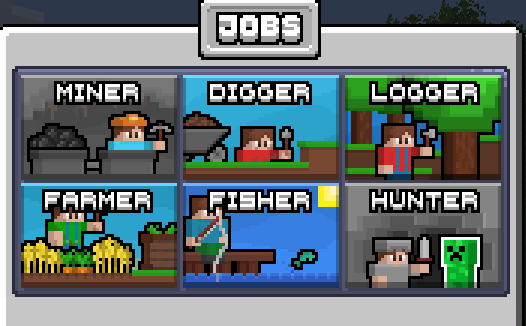
It will open a menu where you can select your job!

<figure><img src="https://1053715587-files.gitbook.io/~/files/v0/b/gitbook-x-prod.appspot.com/o/spaces%2FaV5XVEhwiqu5dMFn9Ejn%2Fuploads%2FtI5VLQVf3KEno4qAV3wt%2Fjobs.png?alt=media&amp;token=e0b02004-3b5e-490e-9caf-f1d9d1c06610" alt=""><figcaption><p>Jobs Menu</p></figcaption></figure>

## **Earning Rewards**

Each job typically offers specific rewards and benefits based on the tasks you perform. Here’s how you can earn rewards:

* **Money:** Many servers have an in-game economy where you earn currency by completing job-related tasks. For example, a Miner earns money by mining ores and selling them.
* **Experience Points (XP):** Completing job tasks can also reward you with experience points, which are useful for enchanting items and advancing skills.
* **Items and Resources:** Some jobs reward you with special items or resources that are valuable for crafting or trading.

**Job Descriptions:**

1. **Miner:** As a miner, your primary responsibility is to explore and extract valuable resources from the depths of the earth. You will dig through caves and mine shafts to collect essential ores like coal, iron, gold, and diamonds. Your work is crucial for providing the raw materials needed for crafting tools, armor, and other essential items. Miners must navigate through various underground hazards, including lava pools and hostile mobs, while maximizing their resource yield. Efficient mining and strategic exploration are key to your success in this role.
2. **Digger:** The digger’s job involves excavating large areas of land to gather materials such as dirt, sand, gravel, and clay. This role is fundamental for clearing space for construction projects, creating foundations, and preparing landscapes. As a digger, you will use shovels and other tools to quickly and effectively remove large quantities of material. Your work supports various building and landscaping projects, helping to shape and develop the world around you. Proper management of resources and efficient excavation techniques are essential for maximizing productivity.
3. **Logger:** As a logger, you are responsible for harvesting wood from trees across different biomes. This involves chopping down trees to collect logs, which are essential for crafting and building. You will manage forests by replanting saplings and ensuring sustainable logging practices to maintain a steady supply of wood. The resources you gather support a wide range of community activities, from building structures to crafting tools and furniture. Your role is critical in maintaining a balance between resource extraction and environmental stewardship.
4. **Farmer:** The farmer’s role involves cultivating crops and raising animals to produce food and other resources. You will plant, grow, and harvest various crops such as wheat, carrots, potatoes, and more. Additionally, you will care for livestock including cows, pigs, and chickens, providing them with the necessary food and shelter. Farmers play a vital role in ensuring a steady supply of food, which is essential for the survival and well-being of the community. Your work also includes managing farmland, improving crop yields, and contributing to the overall agricultural development of your world.
5. **Fisher:** As a fisher, you will focus on catching fish from rivers, lakes, and oceans. Using a fishing rod, you will reel in a variety of fish and other aquatic resources. This role provides a valuable source of food and ingredients, which are essential for maintaining a balanced diet and crafting recipes. Fishermen must be skilled in locating good fishing spots and adapting to different water environments. Your catch not only supports the community’s food supply but also contributes to trading and other economic activities.
6. **Hunter:** The hunter’s job is to track and hunt wild animals in various biomes for their meat, hides, and feathers. This role requires exploring different terrains and using weapons such as bows and swords to take down mobs. Hunters provide essential resources for crafting, cooking, and trading, contributing to the community’s survival and economy. Your skills in tracking, combat, and resource collection are crucial for ensuring a steady supply of valuable materials. Effective hunting also involves understanding animal behavior and adapting your strategies to different environments.


# Emoji System

Overview about the Emoji System


# Waystone System


# Items


# Swords


# katana


# Mirror of Kalandra

The Mirror of Kalandra can copy various items such as...

#### Swords

* Wooden Sword
* Stone Sword
* Copper Sword
* Iron Sword
* Golden Sword
* Diamond Sword
* Netherite Sword

#### Axes

* Wooden Axe
* Stone Axe
* Copper Axe
* Iron Axe
* Golden Axe
* Diamond Axe
* Netherite Axe

#### Shovels

* Wooden Shovel
* Stone Shovel
* Copper Shovel
* Iron Shovel
* Golden Shovel
* Diamond Shovel
* Netherite Shovel

#### Pickaxes

* Wooden Pickaxe
* Stone Pickaxe
* Copper Pickaxe
* Iron Pickaxe
* Golden Pickaxe
* Diamond Pickaxe
* Netherite Pickaxe

#### Hoes

* Wooden Hoe
* Stone Hoe
* Copper Hoe
* Iron Hoe
* Golden Hoe
* Diamond Hoe
* Netherite Hoe

#### Spears

* Wooden Spear
* Stone Spear
* Copper Spear
* Iron Spear
* Golden Spear
* Diamond Spear
* Netherite Spear

#### Extra & Rare Items

* Shield
* Elytra
* Totem of Undying
* Trident
* Mace
* Spawner
* Beacon
* Ancient Debris
* Enchanted Book
* Nether Star
* Heavy Core

#### Smithing Templates

* Netherite Upgrade Smithing Template
* Sentry Armor Trim Smithing Template
* Vex Armor Trim Smithing Template
* Wild Armor Trim Smithing Template
* Coast Armor Trim Smithing Template
* Dune Armor Trim Smithing Template
* Wayfinder Armor Trim Smithing Template
* Raiser Armor Trim Smithing Template
* Shaper Armor Trim Smithing Template
* Host Armor Trim Smithing Template
* Ward Armor Trim Smithing Template
* Silence Armor Trim Smithing Template
* Tide Armor Trim Smithing Template
* Snout Armor Trim Smithing Template
* Rib Armor Trim Smithing Template
* Eye Armor Trim Smithing Template
* Spire Armor Trim Smithing Template
* Flow Armor Trim Smithing Template
* Bolt Armor Trim Smithing Template


# Thermometer

## 🌡️ Guide: The Thermometer & Surviving the Seasons

In this world, the weather isn't just for show—the temperature directly impacts your survival. To avoid freezing to death or suffering from heatstroke, the Thermometer is your most essential tool.

### What is the Thermometer?

The Thermometer is a specialized item that tracks your current temperature in °C in real-time. Since your temperature fluctuates constantly based on where you are and what you do, this tool helps you take action before it’s too late.

***

### How is your Temperature calculated?

Your temperature isn't just a static number; it is a dynamic value influenced by several environmental and physical factors.&#x20;

#### 1. Biomes & Seasons

Every biome and season has a base temperature. In every season the temperature might change look at [<mark style="color:$primary;">Season System</mark>](/system/season-system) for more info.

#### 2. Environmental Factors

* Time of Day: Temperatures drop significantly at night.
* Weather: Rain cools you down; thunderstorms even more so.
* Altitude: The higher you climb (e.g., mountains), the colder it gets.

#### 3. Gear & Behavior

* Armor: Heavy armor retains heat. Great for winter, but a death trap in the desert.
* Physical Activity: Sprinting generates body heat.
* Consumables: Eating certain foods can temporarily affect how your body handles the climate.
* Submersion: Jumping into water helps fight heat, while lava will spike your temperature instantly.

***

#### ❄️ In Extreme Cold

* Heat Sources: Stay close to torches, lit furnaces, or campfires.
* Insulation: Wear a full set of armor to trap body heat.
* Shelter: Go underground or stay inside buildings to block the wind and height modifiers.
* Stay Active: Keep sprinting to slightly raise your core temperature.

#### ☀️ In Extreme Heat

* Cool Down: Jump into a river or the ocean.
* Seek Shade: Avoid direct sunlight; stay under trees or inside caves.
* Remove Armor: Heavy gear acts as insulation—take it off to let your skin breathe.
* Relocate: If possible, leave deserts or savannas during the peak afternoon sun.

***

### Biome Temperature Overview

| Biome                | Base Temperature | Risk Level     |
| -------------------- | ---------------- | -------------- |
| Desert, Savanna, ... | 25 to 36°C       | 🔴 High (Heat) |
| Oceans               | -3 to 24°C       | 🟡 Medium      |
| Jungle, Forest, ...  | 16 to 25°C       | 🟢 Safe        |
| Taiga, Snow, ...     | -9 to 12°C       | 🔵 High (Cold) |